
Articles
Why You Need a Lightweight PDF Editor for Windows 11 Today
Jan
Introduction
Working with PDF files is part of everyday life, whether you’re a student, a professional, or someone managing personal documents. However, many PDF editors are heavy, slow, and packed with unnecessary features. This is why more users are looking for a lightweight PDF editor for Windows 11—a tool that is fast, efficient, and easy to use without draining system resources. In this article, you’ll learn why lightweight PDF editors are becoming essential and how they can transform your workflow.
Why Windows 11 Users Need a Lightweight PDF Editor
Windows 11 is designed for performance and modern workflows, but even with these improvements, heavy applications can slow down your system. A lightweight PDF editor helps you stay productive by reducing lag, lowering memory usage, and keeping your device responsive throughout the day. This is especially important for laptops, older PCs, and users who multitask frequently.
What Makes a PDF Editor Lightweight?
A lightweight PDF editor is not just “small.” It’s optimized for speed, simplicity, and efficiency. Here are the key characteristics that define it.
1. Low System Requirements
A lightweight editor should run smoothly on:
• 4 GB RAM
• Entry‑level processors
• Integrated graphics
This makes it ideal for older laptops, office desktops, and low‑power devices.
2. Fast Document Loading
Large PDFs should open quickly without freezing. A lightweight editor uses optimized rendering to keep everything smooth and responsive.
3. Clean and Simple Interface
A clutter‑free interface helps you work faster. Tools should be easy to find, and the layout should be intuitive even for beginners.
4. Essential Editing Tools
Even if it’s lightweight, the editor must include:
• Text editing
• Highlights and annotations
• Page rotation, extraction, and reordering
• Image insertion
• Export options
5. Efficient OCR
OCR is often slow and resource‑heavy. A modern lightweight editor should offer:
• Fast recognition
• High accuracy
• Optional GPU acceleration
6. Local Processing
Privacy matters. A lightweight PDF editor for Windows 11 should process everything offline, without uploading documents to external servers.
Benefits of Using a Lightweight PDF Editor on Windows 11
Choosing a lightweight editor offers several advantages that improve your daily workflow.
1. Faster Performance
Lightweight editors open quickly and respond instantly, even with large files.
2. Lower Memory Usage
They consume less RAM, allowing you to multitask without slowing down your system.
3. Better Stability
Fewer background processes mean fewer crashes and smoother performance.
4. Ideal for Older Hardware
If your PC is not brand‑new, a lightweight editor ensures you can still work efficiently.
5. Improved Battery Life
On laptops, lightweight software reduces power consumption and extends battery duration.
A Modern Example: TaoMaxDavi PDF Editor
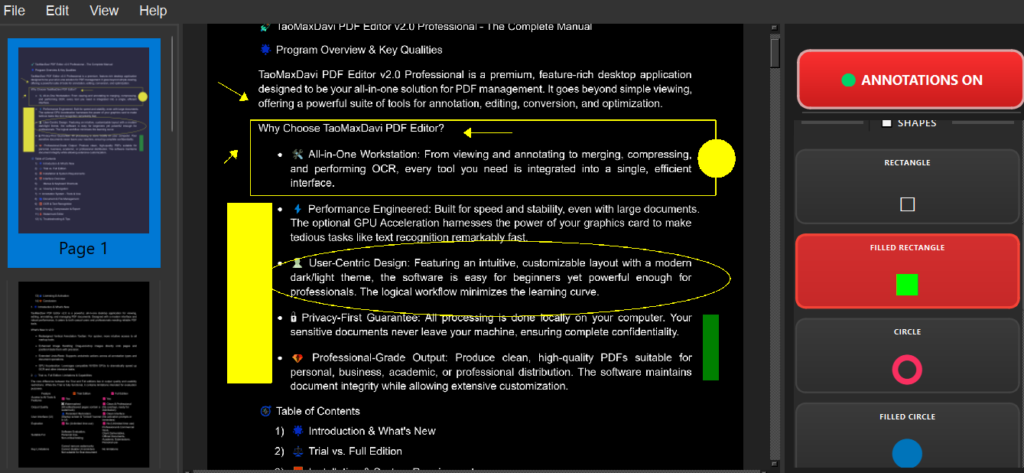
One of the most promising tools in 2026 is TaoMaxDavi PDF Editor, designed specifically to be fast, efficient, and easy to use on Windows 11.
Fast and Responsive
The software launches in seconds and handles large PDFs without lag. Its optimized engine ensures smooth scrolling and quick rendering.
Intuitive Interface
The interface is clean and modern. Tools are organized into clear sections:
• Edit
• Annotate
• Insert
• Manage pages
• OCR
This makes it perfect for both beginners and advanced users.
Advanced OCR with GPU Acceleration
TaoMaxDavi PDF Editor includes a powerful OCR engine. If you have a compatible NVIDIA GPU, OCR becomes extremely fast, making it ideal for scanned documents.
Complete Editing Tools Without Bloat
Despite being lightweight, it includes:
• Text editing
• Highlights and notes
• Image insertion
• Page extraction and rotation
• Metadata editing
• Watermark tools
• Export to PDF or PNG
Low Resource Usage
The software is optimized to run smoothly even on:
• Older laptops
• Office desktops
• Low‑power mini PCs
Privacy‑Focused
All processing happens locally. No cloud uploads. No data sharing. Your documents stay on your device.
How to Choose the Right Lightweight PDF Editor for Windows 11
Here are some tips to help you choose the right tool for your needs.
1. Identify Your Daily Tasks
If you mostly annotate PDFs, choose a simple editor.
If you edit text or images often, choose a more complete solution.
2. Check System Compatibility
Make sure the editor runs well on your hardware.
3. Test the OCR
If you work with scanned documents, OCR quality is essential.
4. Try the Free Version
A trial version helps you evaluate performance before buying.
Conclusion
Choosing a lightweight PDF editor for Windows 11 is one of the smartest ways to improve your productivity in 2026. Lightweight editors offer speed, simplicity, and efficiency without sacrificing essential features. Tools like TaoMaxDavi PDF Editor deliver a perfect balance between performance and functionality, making them ideal for both personal and professional use.
If you want a fast, modern, and privacy‑focused PDF editor, a lightweight solution is the right choice for your Windows 11 device.
Where You Can Download Software Like This
If you’re looking for reliable places to download tools similar to a lightweight PDF editor for Windows 11, there are several trusted platforms that focus on safe, verified, and regularly updated software. One of these is Sooftware.com, a website dedicated to helping users discover high‑quality applications for productivity, creativity, and everyday use.
Sooftware.com offers a curated selection of programs, clear descriptions, and direct download links, making it easier to find lightweight and efficient tools without worrying about unwanted add‑ons or unsafe installers. Whether you need a PDF editor, a media converter, or a utility for your Windows system, platforms like Sooftware.com provide a secure and convenient way to explore new software.
